
A lost key is inconvenient. A former employee whose fob still opens a server room, plant area or school building is a security and safeguarding issue. Knowing how to deploy access control properly means treating it as an operational security programme, not simply fitting readers beside doors.
For SMEs, schools, colleges and Multi-Academy Trusts, the right system improves control without making everyday movement difficult. It gives authorised people appropriate access, creates an audit trail, and enables administrators to respond quickly when roles, risks or site arrangements change. The quality of the planning matters as much as the hardware.
Start with the risks, not the readers
Before choosing cards, fobs, PIN pads or mobile credentials, assess what each building needs to protect. A single office with a small team will have different priorities from a campus with pupils, visitors, contractors, sensitive records and multiple outbuildings.
Walk the site and identify every entry point, including staff entrances, side doors, gates, reception doors, comms cupboards, records storage and areas containing valuable equipment. Look beyond external doors. Internal access control can be just as valuable where finance records, safeguarding files, medicines, examination materials or network infrastructure need tighter protection.
For each area, establish three things: who needs access, when they need it, and what should happen outside those times. This creates a clear basis for the access policy. It also exposes practical issues early, such as a delivery route that cannot be blocked during working hours or a fire exit that requires specialist design.
A security-first assessment should also consider vulnerable points around the controlled door. There is limited value in installing a reader if the lock, frame, hinges or adjacent window can be easily bypassed. The deployment should address the full opening, not just the credential reader.
Define access groups that match real responsibilities
The most effective permissions are simple enough to manage and specific enough to reduce unnecessary access. Rather than allocating rights door by door for every individual, create access groups based on job role, location and working pattern.
A school may need separate groups for teaching staff, facilities teams, office staff, cleaning contractors and visitors. A business may separate general employees, leadership, IT administrators, warehouse staff and approved third parties. A person can belong to more than one group where their duties genuinely require it, but avoid building exceptions into the system as standard practice.
Use the principle of least privilege: provide the minimum access needed to do the job. This limits the effect of a lost credential and makes investigations clearer if an incident occurs. It is also easier to review than a system where access has accumulated informally over several years.
Time schedules add another useful layer. Contractors may need access only during agreed hours; staff can enter their normal workplace during the working day, while a small number of keyholders retain out-of-hours rights. In education settings, schedules should reflect term dates, holiday access and lettings arrangements.
Choose technology that supports the operating model
Access control systems are available in many forms, from standalone keypad locks to centrally managed, networked platforms. The appropriate choice depends on the size of the estate, number of users, existing infrastructure, reporting requirements and future plans.
A small premises with one or two restricted rooms may only require a straightforward solution. However, a multi-site organisation normally benefits from central management, where authorised administrators can add, amend and remove permissions without visiting every door. For trusts and organisations with several locations, this can reduce administration and give leaders a better view of access activity across the estate.
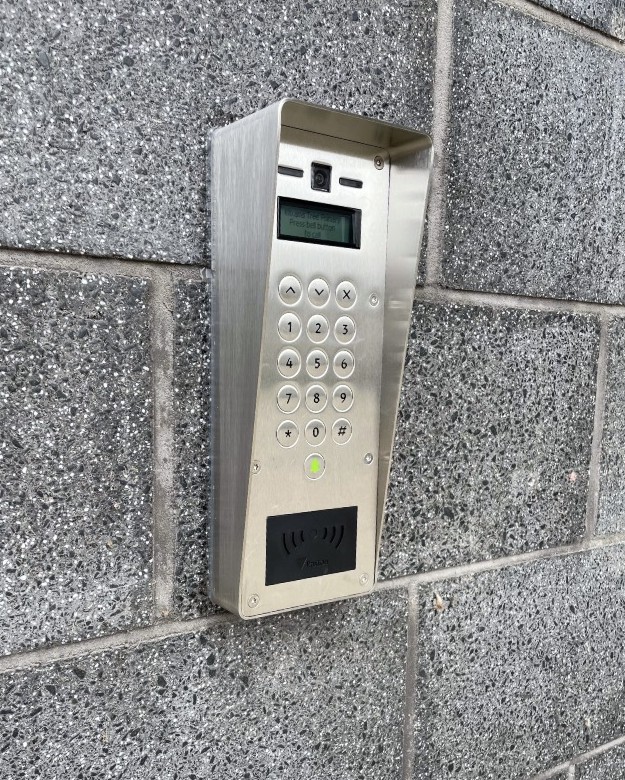
Credentials should be selected with both security and usability in mind. Fobs and cards remain practical for many organisations, while mobile credentials can reduce the reliance on physical tokens. PINs are useful in some settings but should not be the sole control for higher-risk areas, as they can be shared or observed. Sensitive rooms may justify multi-factor access, such as a card plus PIN.
Integration can add value, but only where it serves a defined purpose. Access control may work alongside CCTV, intruder alarms, visitor management or fire systems. For example, an event recorded at a door can be investigated more quickly when the relevant CCTV footage is available. Integration should not create a complicated system that staff cannot support or understand.
Plan the installation around safety and continuity
Physical access control touches several building systems: doors, locks, power supplies, data cabling, fire safety and sometimes emergency escape arrangements. Installation should therefore be planned with facilities leads, health and safety representatives, IT teams and, where relevant, safeguarding leads.
Every controlled door must remain safe in an emergency. The lock type, release method and behaviour during a power failure need to be designed for the door’s use and applicable fire safety requirements. A door that protects equipment may fail secure, whereas a designated escape route may need a fail-safe arrangement. This is not an area for assumptions or a one-size-fits-all specification.
Survey cable routes, power resilience and network capacity before work begins. Wired systems are often preferred for reliability, but wireless or battery-powered options can be useful where cabling would be disruptive or impractical. That convenience has trade-offs: battery monitoring, radio coverage and maintenance responsibility must be included in the plan.
Schedule works to minimise disruption. Schools may prefer major installation during holidays, while offices may need phased work that keeps reception, deliveries and critical operations running. Tell staff what will change, when it will happen and who to contact if their access does not work on day one.
Configure, test and prove the system
A deployment is not complete when the doors lock. Before handover, test each door against the access policy and real-life scenarios. Confirm that authorised users can enter at the right times and that users without permission are refused. Test emergency release, door-held-open alerts, forced-door alerts, power-loss behaviour and relevant alarm or CCTV integrations.
It is equally important to check administration. An authorised manager should be able to issue a new credential, disable a lost one and remove access for a leaver without relying on an installer. Audit logs should be easy to retrieve and meaningful enough to support an investigation. If a report only produces unhelpful technical codes, the system is not delivering its full operational value.
Run acceptance testing with representatives from the people who will use and administer the system. Facilities, reception, IT and senior leadership may notice different problems. A test during normal working conditions will reveal issues that a quiet technical demonstration can miss, such as queues at a busy entrance or unexpected conflicts with visitor procedures.
Make access control part of joiner, mover and leaver processes
The greatest long-term weakness in many access control deployments is not the equipment. It is unmanaged change. People join, change roles, cover different sites, lose credentials and leave. If permissions are not updated promptly, the security model quickly stops reflecting reality.
Assign clear ownership. HR or school administration should trigger access changes, while a named system administrator carries them out and records completion. For organisations with internal IT teams, this can sit within a co-managed process, with specialist support available for configuration, maintenance and wider security integration.
Review access rights on a regular schedule, particularly for restricted areas and temporary users. Termly checks may suit education environments; many businesses will choose quarterly reviews. Remove dormant accounts, expired contractor access and permissions linked to responsibilities that no longer apply.
Lost credentials need a defined response. Staff should know to report them immediately, and administrators should be able to disable them at once. Do not rely on someone returning a fob before their access is removed, particularly where dismissal, safeguarding concerns or an urgent role change is involved.
Maintain the system as a security control
Access control needs ongoing attention just like any other critical technology. Monitor device health, replace failing batteries where applicable, apply supported software and firmware updates, and check that backups of configuration and audit data are available. Keep an accurate record of doors, controllers, credentials, administrators and support contacts.
Cybersecurity also applies to connected access control. Networked controllers, management software and remote administration must be protected with appropriate segmentation, strong administrator accounts and controlled remote access. An internet-connected door system should never become an overlooked route into the wider network.
When access control is planned around people, premises and operational risk, it becomes easier to manage and more useful when an incident occurs. Ask IT Solutions can help organisations across Cambridge and the wider region assess requirements, coordinate deployment and maintain a system that supports security, safeguarding and day-to-day continuity long after installation.